<?xml version="1.0" encoding="utf-8"?>
<?xml-stylesheet type="text/xsl" href="/feeds/atom-style.xsl"?>
<feed xmlns="http://www.w3.org/2005/Atom">
    <id>https://matcohle.me</id>
    <title>Mat</title>
    <updated>2026-01-13T10:10:47.911Z</updated>
    <generator>Astro Chiri Feed Generator</generator>
    <author>
        <name>Mathew</name>
        <uri>https://matcohle.me</uri>
    </author>
    <link rel="alternate" href="https://matcohle.me"/>
    <link rel="self" href="https://matcohle.me/atom.xml"/>
    <subtitle>For the joy of making</subtitle>
    <rights>Copyright © 2026 Mathew</rights>
    <entry>
        <title type="html"><![CDATA[Agentic Coding Is Anything But]]></title>
        <id>https://matcohle.me/agentic-coding-is-anything-but</id>
        <link href="https://matcohle.me/agentic-coding-is-anything-but"/>
        <updated>2025-11-25T00:00:00.000Z</updated>
        <content type="html"><![CDATA[<p>Agentic coding has been a core part of my daily workflow for a while now. I wanted to give it an honest trial - no prejudices, just seeing what it can actually do through deep hands-on experience.</p>
<p>While assembling notes for a different blog post, I realized I had enough material for an intermediary one - a framework I’ve been using to think about agentic coding productivity.</p>
<p>Here’s the plan: build a simplified framework of software engineering and then throw agentic coding into the picture. Once that’s done, the fun part - poking holes in our own model to see what falls out.</p>
<p>Two claims I want to justify: the bottleneck is still you [^1], and agentic coding multiplies your output - it doesn’t add to it. Zero times anything is still zero.</p>
<p>[^1]: As was already established, <a href="https://tidyfirst.substack.com/p/match-the-pipes">the bottleneck is all that matters</a></p>
<h2>Economics Of Software Engineering</h2>
<p>To put it simply, software engineering is about transforming your cognitive capacity into value-generating software. That’s it. When we talk about productivity, we’re not counting lines of code or features delivered. What matters is whether the software, at the end of the day, is useful to customers.</p>
<p>Why state something so obvious? Because in the age of agentic coding, many outputs have become much cheaper to deliver. If we use a vague measure of productivity, we can’t have a productive discussion.</p>
<p>Let’s play with concrete numbers. Say your daily cognitive capacity is 20 units. You spend it on three tasks—a code review (5 units), a bug fix (5 units), a design meeting (5 units)—plus a couple of necessary-but-not-adding-value-right-away tasks like updating docs (1 unit each).</p>
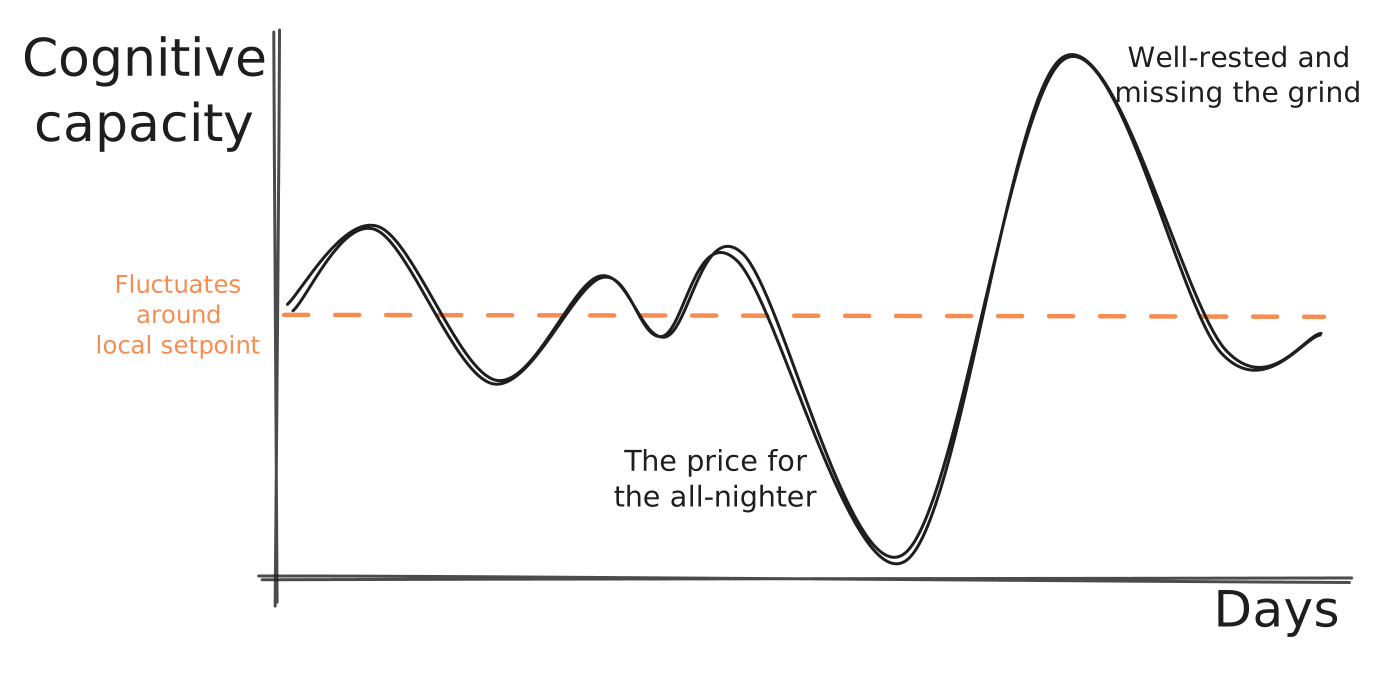
<p>Now to name things properly. I’ll use <code>T</code> notation—<code>T05</code> means a task of 5 cognitive units. <em>Cognitive capacity</em> varies over time: sleep, mood, engagement, meetings fragmenting your day. <em>Value delivered</em> is roughly proportional to <em>cognitive load</em>—with one twist: low cognitive load tasks are usually of low value on their own. Prerequisites for real work, not value-adding by themselves.</p>
<p>Fair warning: I won’t justify how well these concepts map to reality, and I’ll pick numbers that make my point. The goal is a useful framework, not a correct one.</p>
<p><img src="https://matcohle.me/_astro/cognitive-capacity.CrLd93Gx_Z1BKzrn.svg" alt="Talking about how to improve the setpoint is for another blog post" /></p>
<p>To keep things simple, I’ll focus just on the execution: coding, reviewing, thinking. I’m deliberately omitting ideation, understanding user needs, team coordination—all essential, but out of scope here.</p>
<p>Lastly, some tasks exceed our daily capacity—even with full focus, they can’t be done in a single day. For these, we <em>dissolve</em>: instead of one <code>T40</code>, we break it into six <code>T10</code> tasks. Note that the total cognitive load after dissolving is always higher than the original—you pay overhead for planning, context switching, and coordination.</p>
<p>How does this change with an agent?</p>
<h2>What Agents Bring To The Table</h2>
<p>With the framework in place, here’s the core claim:</p>
<blockquote>
<p>Agentic coding decreases <mark>your cognitive load</mark> to deliver tasks.</p>
</blockquote>
<p>If you put no cognitive energy in, there’s no value out.</p>
<p>I’m claiming the agent’s added value is a function of your invested cognitive load. Multiplicative, not additive. No matter how I’ve tried, I can’t get sensible output from an agent without being involved myself.</p>
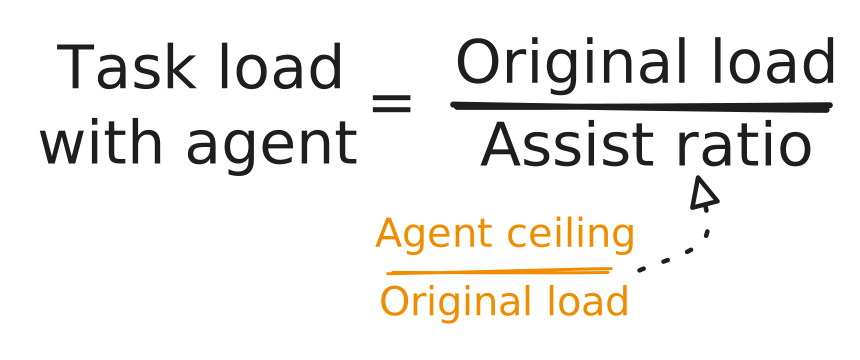
<p>In framework terms: the agent reduces a task’s <em>cognitive load</em> by <em>assist ratio</em>—one that I suspect depends heavily on task complexity:</p>
<p><img src="https://matcohle.me/_astro/formula.excalidraw.D5s67gzq_Z1W2gIy.svg" alt="" /></p>
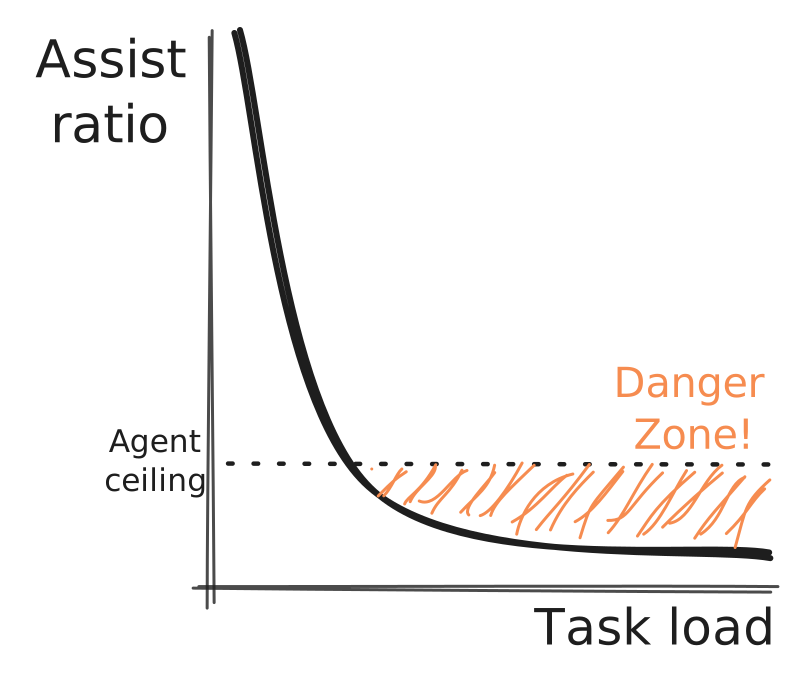
<p>The agent only helps when a task’s <em>cognitive load</em> is below the <em>agent ceiling</em>—a rough measure of model capability. The more demanding the task, the less gain you get. But here’s the kicker: it can actually get <em>worse</em>. If a task exceeds the ceiling, you’ll spend more time fixing the agent’s bugs and explaining what should be done than if you’d just done it yourself.</p>
<p><img src="https://matcohle.me/_astro/danger-zone.0yv2qnvn_ZWjXkg.svg" alt="Yep, the suggested relationship is hyperbolic" /></p>
<p>And <em>dissolving</em> doesn’t necessarily save you—the overhead of breaking a task into smaller pieces can outweigh the agent’s speedup on each piece. Some tasks can’t be dissolved at all: when you need to solve the interplay between parts of a system, the solution is inherently holistic. Iterative improvements just send you in circles.</p>
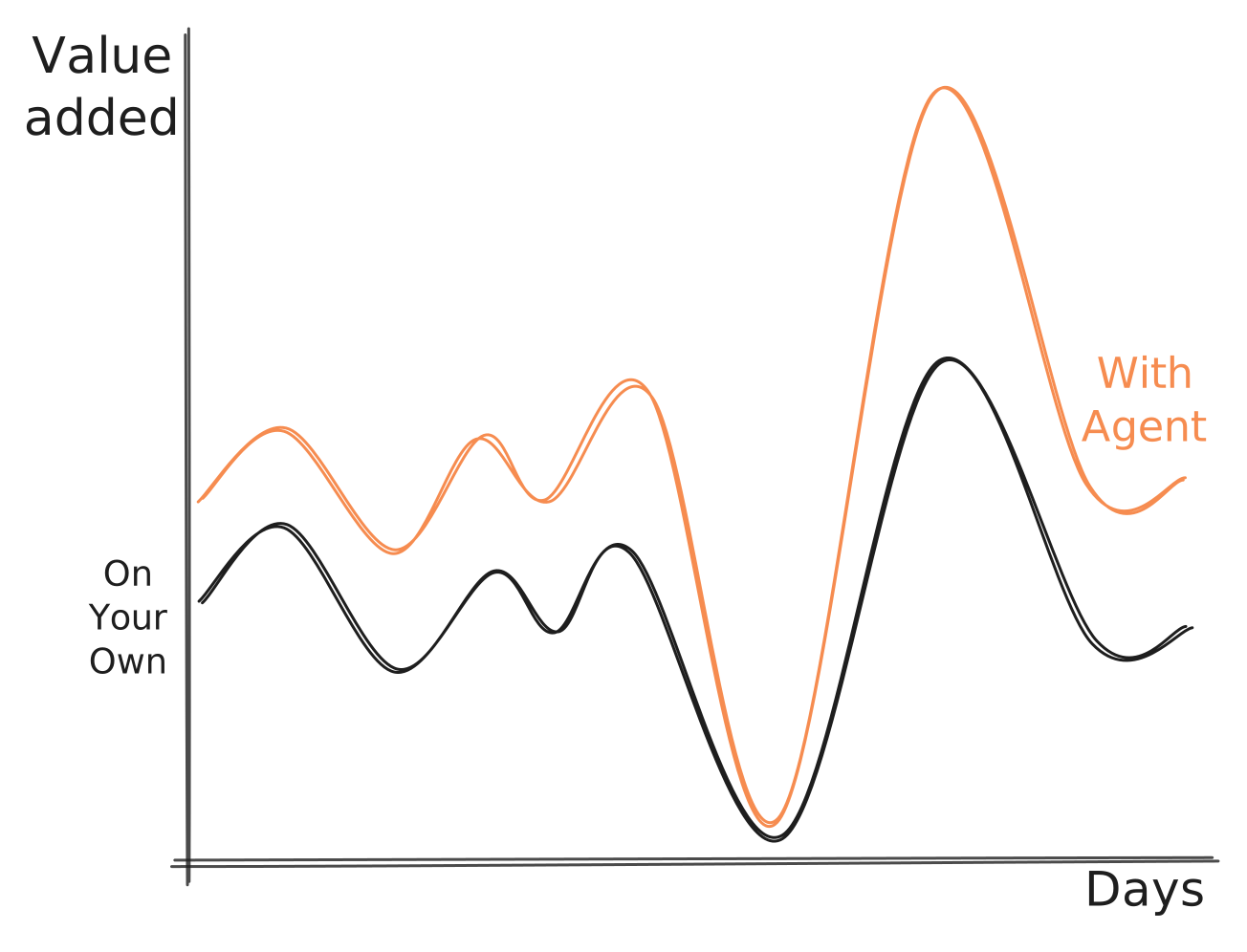
<p>So why is it bad news? It doesn’t scale! Or to be more precise, it still scales only with your cognitive capacity—which is very much bounded. When you’ve been doing 10+ hour sessions for the past few days and have a bad day afterwards, the agent won’t save you. You’ll be just as unproductive as you would without it.</p>
<p><img src="https://matcohle.me/_astro/value-added.CmYKBR3y_RhWx1.svg" alt="Entering the valley is now really costly" /></p>
<h2>Running The Numbers</h2>
<p>Now for the fun part: let’s put the framework to work and see what agentic coding actually does to your <em>value added</em>.</p>
<p>Take a <code>T40</code> task. How does delivery change with an agent in the mix?</p>
<p>Without the agent, the task is too big for a single day—so you <em>dissolve</em> it into two <code>T15</code>s and four <code>T05</code>s, delivering in 2.5 days. For this example, let’s set the <em>agent ceiling</em> at 10 cognitive units.</p>
<p>Here’s the catch: the <code>T15</code>s exceed the ceiling, so the agent would hurt us there. We dissolve further—each <code>T15</code> becomes five <code>T05</code>s. With fourteen <code>T05</code> tasks and an <em>assist ratio</em> of 2, we finish in under two days[^2].</p>
<p>[^2]: Just in case I lost you. There are in total 70 cognitive units to drain. Assist ratio of 2 makes it 35 units. With daily capacity of 20, it takes 35 / 20 days.</p>
<p>Like that’s great! Two is definitely less than two and a half before. But notice: the marketed “doubled productivity” translates to only ~40% more <em>value added</em>. The dissolve overhead eats the rest.</p>
<p>Two factors at play.</p>
<p>First, we had to <em>dissolve</em> more—and dissolving always costs extra. This overhead is driven by the <em>agent ceiling</em>, which I expect will rise over time. As it does, we’ll speed up tasks already below the ceiling <em>and</em> avoid dissolving tasks that currently exceed it.</p>
<p>Second, task profile matters. If your work is mostly small tasks—say, ten <code>T05</code>s—you get the full <em>assist ratio</em> benefit with no dissolve overhead. A <code>T40</code> that needs breaking apart? That’s where the gains shrink.</p>
<p>When I read posts from people claiming 10x productivity with agents and try to square it with my very different experience, I explain it this way: they’re reporting <em>assist ratio</em> on subset of tasks, not overall <em>value added</em>. Or I’m doing something really wrong and missing out on a lot of gains.</p>
<p>So what’s my own estimate? A nice round <strong>two</strong>. I feel roughly twice as productive with agentic coding. Of course, I sometimes burn myself out—low-productivity days are inevitable. So the 2x is averaged across everything. The real lever right now does not seem to be the agent; it’s avoiding the down days in the first place.</p>
<h2>The Implications</h2>
<p>Time to collect on our framework investment.</p>
<p>The first to come to mind: given the multiplicative, not additive, nature of <em>assist ratio</em>, you still need people to do the work. If you’re worried about the future of software engineering, either you’re safe—or you should be rooting for the <em>agent ceiling</em> to stay low.</p>
<p>Teams with no time to do the work are missing out the most. The gap between them and teams who can actually focus is now multiplied by whatever <em>assist ratio</em> you believe in.</p>
<p>The silver lining? This creates pressure to give engineers space to be productive. Maybe fewer meetings and less bureaucracy are in your future. Fair warning though: once you have that space, higher expectations will follow.</p>
<p>Who gains the most? Teams whose work is mostly tasks with small cognitive load. You get the full multiplier without the dissolve penalty.</p>
<p>Offload cheap cognitive tasks to the agent. They don’t add value on their own, but the agent handles them efficiently—freeing your cognitive buffer for the complex stuff. Think of pre-formatter days: manually aligning code, nitpicking alignment in reviews. Then <code>ruff</code>/<code>cargo fmt</code>/<code>gofmt</code>/… came along. Run a command, move on. Same principle here.</p>
<p>Finally, the <em>value added</em> gain will be small if value mostly comes from outside engineering. Imagine a business where it’s not about choosing the right database—it’s about the product correctly identifying customer needs and designing features to capture the market. Engineers will spend less time on mundane tasks, more time on architecture decisions, but the value is created elsewhere.</p>
<p>If nothing else, may this help you talk about productivity more… productively.</p>
]]></content>
        <published>2025-11-25T00:00:00.000Z</published>
    </entry>
    <entry>
        <title type="html"><![CDATA[Just Gracefully Shutdown]]></title>
        <id>https://matcohle.me/just-gracefully-shutdown</id>
        <link href="https://matcohle.me/just-gracefully-shutdown"/>
        <updated>2025-11-19T00:00:00.000Z</updated>
        <content type="html"><![CDATA[<p>Last time I wrote <a href="/what-is-async-anyway.md">about async</a>, I went on about how global event loops can bite you. Then I spent half a day debugging why I shot myself in the foot for exactly those reasons. Classic.</p>
<p>Global state mutation got me while implementing signal handling for graceful shutdown. You know, the kind that prevents data loss by finishing in-flight requests before your service dies.</p>
<p>Here’s what breaks, how to fix it, and why it matters. Full code examples live <a href="https://github.com/mathewcohle/data-async-shovel">in the repository</a>.</p>
<h2>tl;dr</h2>
<p>The gist is: <strong>signal handlers should coordinate shutdown, not execute it</strong>!</p>
<p>Let’s unpack the core issue and the salvage right away. My advice is to avoid the following pattern:</p>
<pre><code class="language-python">loop = asyncio.get_running_loop()

def handle_signal(sig: signal.Signals) -&gt; None:
    tasks = asyncio.all_tasks(loop) # &lt;- this is the culprit!
    for task in tasks:
        task.cancel() # the execution happens right away

for sig in (signal.SIGTERM,):
    loop.add_signal_handler(sig, lambda s=sig: handle_signal(s))

# code to spawn the tasks: TaskGroup, asyncio.create_task, ...
</code></pre>
<p>or its variations like <code>loop.stop</code> unless you have full control over the scheduled tasks. Canceling <code>asyncio.all_tasks()</code> terminates third-party library internals you don’t control, breaking their cleanup logic and causing data loss.</p>
<p>To my surprise, the internet is <a href="https://superfastpython.com/asyncio-control-c-sigint/">full</a> of <a href="https://roguelynn.com/words/asyncio-graceful-shutdowns/">such</a> <a href="https://code.luasoftware.com/tutorials/python/asyncio-graceful-shutdown">advice</a>—including <a href="https://docs.python.org/3/library/asyncio-eventloop.html#set-signal-handlers-for-sigint-and-sigterm">standard library docs themselves</a>.</p>
<p>Instead, do something like this:</p>
<pre><code class="language-python">loop = asyncio.get_running_loop()
event = asyncio.Event()

def handle_signal(s: signal.Signals, e: asyncio.Event):
    e.set() # just signal, don't execute

# Register signal handlers
for sig in (signal.SIGTERM,):
    loop.add_signal_handler(
      sig, lambda s=sig, e=event: handle_signal(s, e)
    )

async with asyncio.TaskGroup() as tg:
    tasks = [
      tg.create_task(worker()),
    ]

    await event.wait()
    # signal received, now it's time to execute the shutdown
    for t in tasks:
        t.cancel() # &lt;- the solution, cancel just our own tasks
</code></pre>
<p>In case your curiosity has been depleted, stop reading and take the pattern to your production code. For those of you feeling adventurous, let’s dive in.</p>
<h2>The Problem</h2>
<p>Building on <a href="/what-is-async-anyway#managing-the-forking-points">my previous efforts</a>, here’s a slightly edited version of the task life cycle:</p>

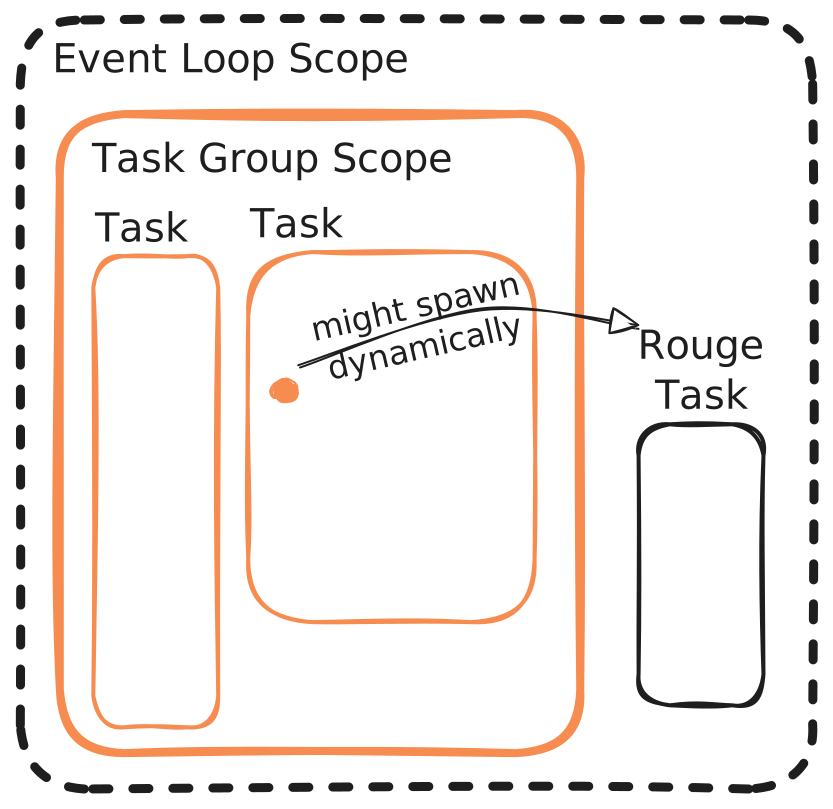
<p><img src="https://matcohle.me/_astro/rogue-task.ButuQLR2_26SBk4.svg" alt="Runtime loops from left to right, code executes from top to bottom" /></p>
<p>A rogue task is any task scheduled outside your TaskGroup - typically by library code you don’t control. Since it lives outside the TaskGroup, it won’t get cancelled when exceptions happen (<a href="https://docs.python.org/3/library/asyncio-task.html#asyncio.TaskGroup">by design</a>). That’s actually fine - these are usually library internals with their own cleanup logic.</p>
<p>So the happy path flow looks like this:</p>

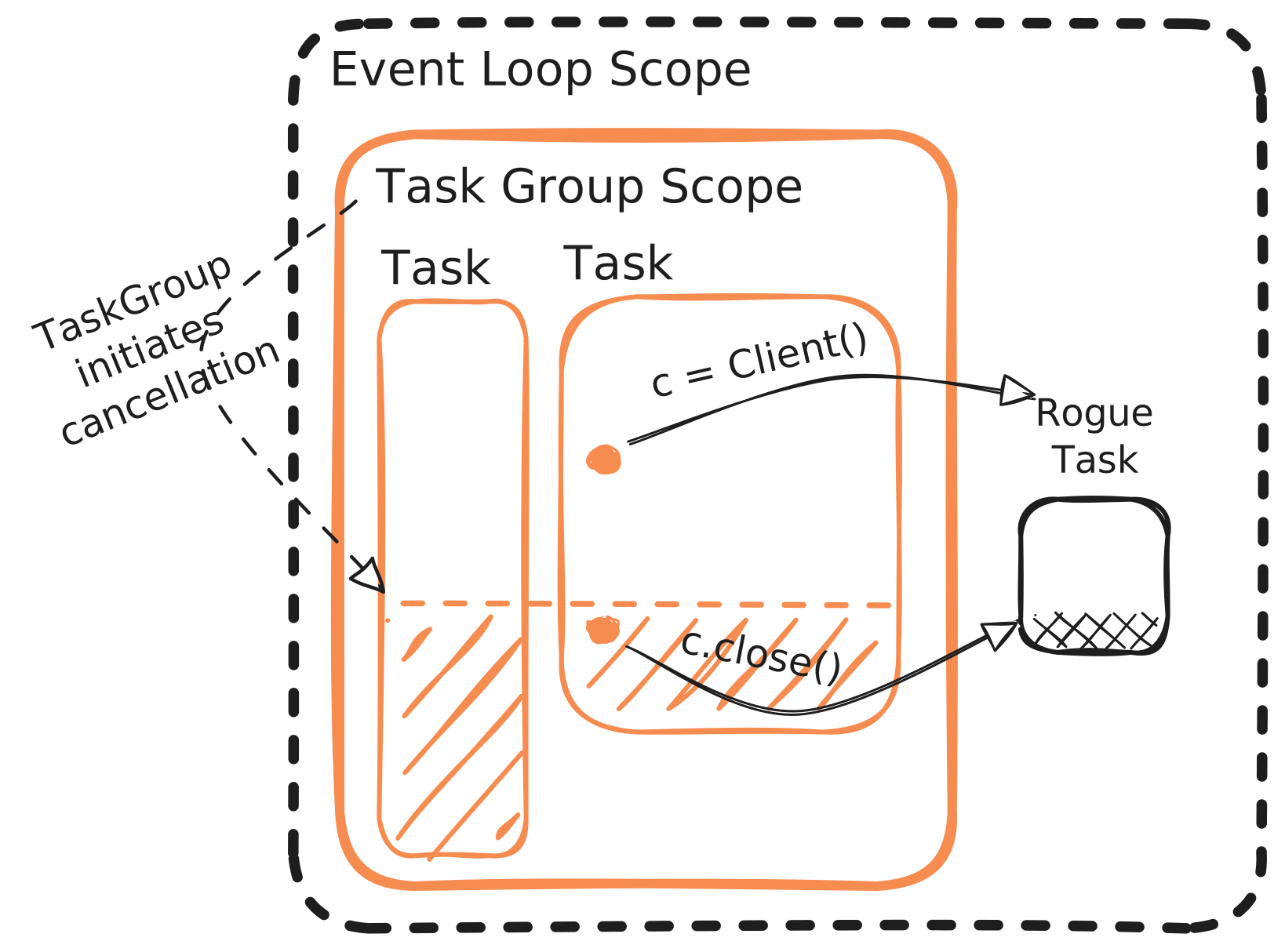
<p><img src="https://matcohle.me/_astro/happy-path.BNFIHX-2_1aeQXX.svg" alt="" /></p>
<p>The shaded parts are the <code>except CancelledError</code> blocks - where graceful shutdown actually happens.</p>
<p>The signal handler lives outside the event loop, so when we cancel tasks from there, we’re hitting the rogue task too. Even if our code responsibly calls <code>c.close()</code>, the bug still happens - the rogue task gets killed mid-flight [^1].</p>
<p>[^1]: Technically depends on your signal handler. With <code>task.cancel()</code>, the rogue task gets sent <code>CancelledError</code> via <code>.send()</code></p>

<p><img src="https://matcohle.me/_astro/abruptly-terminated.C9ckci-J_ZsacbG.svg" alt="" /></p>
<p>It is an art to strike the right balance between using <em>short-yet-academic</em> and <em>proper-but-overwhelming</em> examples when illustrating the problem. Thus, let me do my best and introduce our toy application, <a href="https://github.com/mathewcohle/data-async-shovel">data-async-shovel</a>.</p>
<p>It’s dead simple - two <code>asyncio</code> tasks <code>read_data</code> and <code>store_data</code> talking via a queue. The goal is to make it behave nicely on <code>SIGTERM</code> without losing data.</p>
<p>The interesting bit is <a href="https://github.com/mathewcohle/data-async-shovel/blob/master/src/das/storage.py">storage.py</a> - a simple file writer with a twist: the writes <a href="https://github.com/mathewcohle/data-async-shovel/blob/master/src/das/storage.py#L42">are scheduled as separate tasks</a>.</p>
<p>It has a close method that <a href="https://github.com/mathewcohle/data-async-shovel/blob/master/src/das/storage.py#L89">waits for scheduled tasks to finish</a>. Since I already spoiled the bug, you can guess what happens - messing with global event loop state cancels the client’s internal tasks which <a href="https://github.com/mathewcohle/data-async-shovel/blob/master/src/das/storage.py#L98">causes data loss</a>.</p>
<figure>


  <figcaption>Atomic rename .part -&gt; .txt happens only if all data was written successfully</figcaption>
</figure>
<p>I discovered this while swapping clients in an otherwise working implementation. <a href="https://pypi.org/project/solace-pubsubplus/">The original client</a> used <code>threading</code> internally, so task cancellation had no effect. Then I switched to a client <a href="https://github.com/nats-io/nats.py/blob/170ae2c93dfe0804a99c0ae7afcd6e0af4e7732d/nats/src/nats/aio/client.py#L786">implemented via asyncio</a>, and suddenly weird timeouts everywhere. Let me praise <a href="https://anyio.readthedocs.io/en/stable/signals.html">AnyIO</a> which makes this whole thing dead simple if you’re using it.</p>
<p>The example is complete, yet there is still a lot of fun you can have with it. The following are left as exercises to the reader:</p>
<ul>
<li>Implement retrying around <code>graceful_runner</code>. For example, imagine <code>storage.ready()</code> raises a temporary exception which should be retried</li>
<li>Currently, the application runs forever. Implement coordinated shutdown after 1k messages have been read and figure out what else needs to be changed to make the implementation work (hint: race it!)</li>
<li>Reimplement <code>Storage.close</code> using <code>asyncio.gather + asyncio.wait_for</code> and try to figure out why the behavior changes</li>
</ul>
<p>It is interesting to observe how the implementation complexity inevitably rises with every added feature.</p>
<p>Hope this saves you some debugging time and more importantly lost data in the production. See you next time <a href="/report-from-the-trenches">at report from the trenches</a>.</p>
]]></content>
        <published>2025-11-19T00:00:00.000Z</published>
    </entry>
    <entry>
        <title type="html"><![CDATA[Even More On Coding Agents]]></title>
        <id>https://matcohle.me/even-more-on-coding-agents</id>
        <link href="https://matcohle.me/even-more-on-coding-agents"/>
        <updated>2025-10-13T00:00:00.000Z</updated>
        <content type="html"><![CDATA[<p>You might have been wondering what has happened to my blogging enthusiasm. Have I run out of the steam after the initial spree? While the backlog of ideas to write about is full, the answer is simple: I’ve been experimenting with coding agents and I have to say—I’m having a blast!</p>
<p><a href="/coding-agents-for-paranoid">Previous</a> <a href="/more-on-coding-agents">posts</a> were focused on technical and security aspects of using coding agents. This time I’m going to share my perspective after using the technology extensively for several days.</p>
<p><img src="https://matcohle.me/_astro/limit-reached.DXY_29af_n2wEN.webp" alt="First, second, and last reason this post exists. Also gives you deadline to write it for free." /></p>
<h2>Way Different Coding Experience</h2>
<p>A brief bit of background about me: It’s been several years since programming was my day-to-day focus. While I’ve been fortunate to keep in touch with current technologies, my hands-on coding skills have inevitably become a bit rusty as my daily agenda was mostly driven by the calendar meetings [^1].</p>
<p>[^1]: In hindsight, I should have <a href="https://world.hey.com/dhh/pay-yourself-first-e86f8147">pushed back harder</a></p>
<p>So, naturally, I was really excited to get back to the keyboard, thinking about the good times when the code runs smoothly and the frustrating moments of chasing down bugs caused by a wrong conditional. I somehow skipped the phase of researching how people are using coding agents, decided on the project and just get to the work.</p>
<p>After initial cautious steps reading and manually accepting every agent code suggestion, I’ve settled to using it in “auto-accept” mode for file changes. And quite quickly it become clear that working with it will be nothing like what I was used to.</p>
<p>The best framing I’ve found: you become the code reviewer, the agent becomes the developer[^2]. It boils down to how much you enjoy doing code reviews. Since receiving and giving code reviews was one of the best parts of the developer job, adapting to this workflow was natural for me. I can also understand why folks who find joy in hand-wiring everything themselves might object.</p>
<p>[^2]:
And it’s turned out <a href="https://www.youtube.com/watch?v=MrfiUMm2Qxk">I’m not the only one!</a>. As Steve puts it:</p>
<pre><code>&gt; And so like I don't mind the idea of like writing specifications for six AI agents to go write some code and then have me code review it. Like people like man don't you love code writing code and hate doing code review? And I'm like I kind of like planning stuff and doing code review.
</code></pre>
<p>Even though counting lines of code is always a bad idea, I couldn’t resist and checked the stats:</p>
<table>
<thead>
<tr>
<th>Date</th>
<th>Lines Added</th>
<th>Lines Removed</th>
</tr>
</thead>
<tbody>
<tr>
<td>2025-10-07</td>
<td>2011</td>
<td>165</td>
</tr>
<tr>
<td>2025-10-08</td>
<td>1527</td>
<td>558</td>
</tr>
<tr>
<td>2025-10-10</td>
<td>1997</td>
<td>793</td>
</tr>
<tr>
<td>2025-10-11</td>
<td>1246</td>
<td>120</td>
</tr>
<tr>
<td>2025-10-12</td>
<td>1046</td>
<td>342</td>
</tr>
<tr>
<td>2025-10-13</td>
<td>2803</td>
<td>1155</td>
</tr>
<tr>
<td>2025-10-14</td>
<td>1946</td>
<td>1210</td>
</tr>
<tr>
<td>2025-10-15</td>
<td>2083</td>
<td>503</td>
</tr>
</tbody>
</table>
<p>These numbers are misleading in predictable ways. The early project phase inflates additions—laying foundation, establishing structure, writing initial tests.</p>
<p>Still, <em>lines added</em> is mostly represented by reviewed code that passes tests and works[^3]. The numbers confirmed what I felt: consistent non-trivial daily output.</p>
<p>[^3]: as long-term <a href="https://www.gerritcodereview.com/">gerrit</a> and <a href="https://jg.gg/2018/09/29/stacked-diffs-versus-pull-requests/">stacked diffs workflow</a> fanboy</p>
<p>Sharing this isn’t a subtle attempt to convince you just how productive a coding agent can make you—<a href="#productivity-gains">we’ll get to that later</a>. My motivation was to form a genuine opinion about how useful it really is for day-to-day work.</p>
<p>Let me share the details about how I’ve been using it.</p>
<h2>Actual Workflow</h2>
<p>Firstly, I’m doing everything locally as it feels like it vastly improves the speed of iteration. Since we are doing code review <em>all the time</em>, you need a good way how to read diffs and navigate around the codebase. I think that pushing to remote and reviewing in browser UI gives you much worse experience and highly recommend to find a way how to avoid it.</p>
<p>Having a good setup for code navigation helps a lot. Usually, I do many iterations of quick back-and-forth asking the agent to update the behavior and jumping around the code to check the code changes align. Besides <code>go-to</code> keyboard shortcut, tools like <a href="https://lazyvim-ambitious-devs.phillips.codes/course/chapter-15/#_checking_your_git_status">quick way to show only modified files</a> give you even more boost.</p>
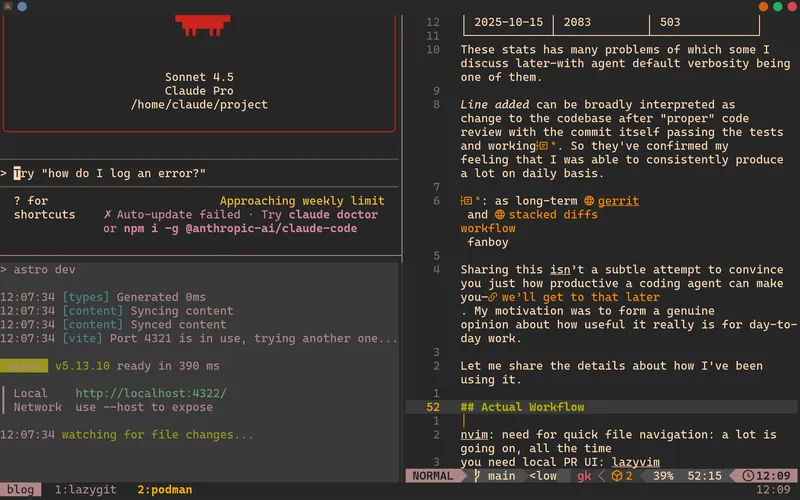
<p>The essential part of iterating effectively is to find a way how to review incremental changes done by the agent. I’m using <a href="https://git-scm.com/book/en/v2/Git-Tools-Interactive-Staging">git interactive staging</a> via <a href="https://github.com/jesseduffield/lazygit">lazygit</a> to isolate the code already reviewed and marked as “good enough” from the usually wild intermediary result.</p>

<p><img src="https://matcohle.me/_astro/agent-flow.h5ZOVawR_AMe0P.svg" alt="" /></p>
<p>Whenever it seems like the code changes might be working, I’m running tests or the service itself in a dedicated development container so I do not have to worry about <a href="/more-on-coding-agents#what-can-go-wrong">accidentally executing malicious code</a>.</p>
<p><img src="https://matcohle.me/_astro/modern-ide.Bv8CxBn6_Z2tTHvm.webp" alt="Modern IDE - neovim, lazygit and command line is all you need" /></p>
<p>Besides the technical tooling side, it seems useful to explicitly keep track of what we are working on and what’s ahead of us. I regularly ask the agent to write down the session progress to <code>worklog.md</code> shared across sessions. The task list is part of the file as simple checkbox list—no fancy issue tracker for now.</p>
<p>Lastly, I often use the agent to discuss the architecture first. I usually prepare at least short draft with focus on principles I would like to follow and ask the agent to suggest the solution and write it down as a <a href="https://alexander.holbreich.org/adr_method/">decision record</a>. Then we iterate on it for a while, usually me asking clarifying questions to get the grasp of the proposal. Once the document is ready, I use it as starting point when asking for the implementation itself.</p>
<h2>Bring The Skill, Get The Thrill</h2>
<p>The agent’s usefulness is proportional to your domain knowledge. I learned this the hard way.</p>
<p><a href="https://www.youtube.com/watch?v=45kVol96IlM&amp;pp=0gcJCfwJAYcqIYzv">Inspired by a podcast talking about coding agents</a>, I decided to try <a href="https://www.pulumi.com/">Pulumi</a> for infrastructure management—without actually knowing anything about it! Two days of running in circles followed. The agent and I crafted detailed decision records, discussed trade-offs, implemented solutions. Everything felt seemingly productive except the implementation still not working.</p>
<p>This period ended once I finally got fed up, read the actual docs, and realized our carefully crafted approach was fundamentally wrong. As an example, the agent had reasoned strongly that using also <a href="https://kustomize.io/">kustomize</a> and bare <code>kubectl</code> on top of Pulumi makes perfect sense. To my great surprise, such setup is completely redundant as Pulumi handles all of that.</p>
<p>Contrast that with earlier in the week. I was implementing a service I’d built variations of many times before. It was a blaze. I knew precisely what I wanted and how it should be structured. The agent delivered exactly what I needed, and the code worked.</p>
<p>The pattern is clear: when you know what good looks like, you can get the good output out of it. When you don’t, it produces plausible-sounding nonsense <a href="https://www.lesswrong.com/posts/YABJKJ3v97k9sbxwg/what-money-cannot-buy">you can’t evaluate</a>. The default output right now is mediocre at best—verbose documentation stuffed with bullet points like we’re gunning for promotion in a big corp.</p>
<p>Code quality is usually acceptable for scripts but needs explicit guidance to avoid ugly patterns. The key competence isn’t writing code as that’s cheap and quick, it’s managing the complexity of what’s being produced and recognizing when it’s gone off the rails.</p>
<p>Stack mediocre solutions on top of each other and you hit the complexity breaking point. It’s technical debt accumulation, now exponentially faster.</p>
<p>This is great news for senior people. The agentic workflow supercharges you when you know the drill. Instead of spending precious time writing code, you can think—about high-level architecture, about what to do next, about how features fit the bigger picture. You review, you guide, you design.</p>
<p>But it’s likely terrible news for newcomers. There’s still no shortcut to understanding how things actually work. The trap is real: skip the hard part and you’ll build a house of cards without realizing it. The tool can help you learn—use it for tailored examples, for exploring concepts—but resist the temptation to leap ahead of your understanding.</p>
<p>The agent can <a href="https://www.lesswrong.com/w/babble-and-prune">babble a lot, prune</a>!</p>
<h2>On Productivity Gains</h2>
<p>100x or even 10x overall productivity promises are bullshit. Yet there are specific tasks where the gains are real and I hope to never write them by myself again.</p>
<p>If you find yourself:</p>
<ul>
<li>writing a quick automation script</li>
<li>complaining about missing documentation instead of addressing gaps</li>
<li>or manually creating structures for encoding and decoding</li>
</ul>
<p>then you are wasting your time.</p>
<p>Another amazing thing is the ability to experiment fearlessly. I vividly remember the planning discussions when we were forced to make educated guess because the time to develop the prototype to test the idea was simply too long. What a joy I have in these situations when I can instead ask the agent to wire up the prototype, take a look at ugly implemented yet working version, tinker with it and afterwards makes much better decision.</p>
<p>Moreover, it is much easier to automate. Whenever I catch myself doing something over and over, I ask the agent to create a script to do it for me with a hard stop to abandon if it’s not done in couple of minutes. For example, I’m using a convention that commit message starts with the part of repository it affects[^4]. After being annoyed for a while, I asked the agent to write me git hook to prepare the title.</p>
<p>[^4]: to help with navigation in codebase organized as a monorepo</p>
<p>:::details
All written by the agent. I might even start to like <code>bash</code></p>
<p>The hook inspects staged files, extracts directory names from the monorepo structure (services/tools/packages), and auto-prefixes commit messages with the affected component names.</p>
<pre><code class="language-bash">#!/bin/bash

COMMIT_MSG_FILE=$1
COMMIT_SOURCE=$2

# Skip for merge, squash, and amend commits
if [ "$COMMIT_SOURCE" = "merge" ] || [ "$COMMIT_SOURCE" = "squash" ]; then
  exit 0
fi

# Get the list of changed files (staged files)
CHANGED_FILES=$(git diff --cached --name-only)

# Extract directories from changed files
DIRS=$(echo "$CHANGED_FILES" | grep -E '^(services|tools|packages)/' | cut -d'/' -f1,2 | sort -u)

# Count how many different subdirectories are affected
DIR_COUNT=$(echo "$DIRS" | grep -v '^$' | wc -l)

if [ "$DIR_COUNT" -eq 0 ]; then
  # No files in services/tools/packages, exit without modifying
  exit 0
fi

# Get current commit message
CURRENT_MSG=$(cat "$COMMIT_MSG_FILE")

# Skip if message is empty or just comments
if [ -z "$(echo "$CURRENT_MSG" | grep -v '^#')" ]; then
  exit 0
fi

# If there's only one subdirectory, use its name
if [ "$DIR_COUNT" -eq 1 ]; then
  SUBDIR=$(echo "$DIRS" | cut -d'/' -f2)
  PREFIX="$SUBDIR:"
else
  # Multiple subdirectories
  SUBDIRS=$(echo "$DIRS" | cut -d'/' -f2 | tr '\n' ',' | sed 's/,$//')
  PREFIX="$SUBDIRS:"
fi

# Check if prefix is already in the message (handle comments too)
FIRST_LINE=$(echo "$CURRENT_MSG" | grep -v '^#' | head -n1)
if ! echo "$FIRST_LINE" | grep -q "^\\$PREFIX"; then
  # Preserve comments and structure
  echo "$PREFIX $CURRENT_MSG" &gt;"$COMMIT_MSG_FILE"
fi

</code></pre>
<p>:::</p>
<p>As already mentioned, the productivity goes out of the window when working on areas where you lack the knowledge. Another questionable area is likely the gains in niche areas like <a href="https://dgerrells.com/blog/how-fast-is-javascript-simulating-20-000-000-particles">low level performance optimization</a>.</p>
<p>Currently, there are two bottlenecks.</p>
<p>I hit the session usage limit regularly. Yes, it can be solved easily by throwing more money at it. But usually I use the time to either do more reviewing and testing or simply take a coffee break. Because funny enough, the biggest bottleneck seems to be <em>myself</em>.</p>
<p>Reviewing the code from morning till evening drains the energy a lot. Couple of days I just felt really exhausted and called it the day. It is no joke to seriously design third decision record in a row. I could asked the agent to do more on that day. But it would not be productive as the generated code would be waiting for my review the next day.</p>
<p>I’m not really sure how people are running multiple agents in parallel. It feels like you end up in situation with the whole team yelling at you waiting for your code review. At which point you either give up and LGTM on <code>+/-5000 line changed</code> patches or put your code review hat on and resolve them one by one.</p>
<p>Let me finish with some speculations. I think this is great time for people looking to create. If you are working in a big team, my suggestion would be to split into smaller units that can move independently. You can iterate and explore faster, build end-to-end solutions more easily, deliver bigger scopes.</p>
<p>The coding agent workflow rewards autonomy and punishes coordination overhead. Every approval gate, every handoff, every coordination point kills the advantage.</p>
<p>It’s never been more feasible to do so much with so few people.</p>
]]></content>
        <published>2025-10-13T00:00:00.000Z</published>
    </entry>
    <entry>
        <title type="html"><![CDATA[More On Coding Agents]]></title>
        <id>https://matcohle.me/more-on-coding-agents</id>
        <link href="https://matcohle.me/more-on-coding-agents"/>
        <updated>2025-10-05T00:00:00.000Z</updated>
        <content type="html"><![CDATA[<p>Previously, we created a solution to <a href="/coding-agents-for-paranoid">run a coding agent locally in isolation</a>. In my rush to share the working solution, I glossed over the security stuff—like what could actually go wrong running a coding agent on your machine, and what containerization helps with.</p>
<p>Worse still, the post might leave you with a dangerous false sense of security, which would haunt me endlessly.</p>
<p>So let’s do this properly. I’ll describe my simplified model of what a coding agent actually is, walk through the risks with examples of how things could go wrong, and clarify which problems containerization solves—and which ones it doesn’t.</p>
<h2>Coding Agent Simplified</h2>
<p>Nuanced discussion tends to benefit a lot from having <em>any</em> model explicitly defined. It helps the speaker to explain the ideas and the audience to understand and challenge them.</p>

<p><img src="https://matcohle.me/_astro/ca-simplified.CuXpnDrc_10A1L9.svg" alt="Very simplified version of what I think coding agent is" /></p>
<p>This is what gets executed on your machine. <em>User Interaction Module</em> reads your prompts and writes back LLM output to you. <em>LLM Module</em> is likely very thin wrapper around sending well formatted HTTP POST to model API. <em>Shell Execution Module</em> is the code responsible for executing shell commands on your machine-I think about it as glorified <code>eval &lt;LLM-requested-command&gt;</code>.</p>
<p>Just to be sure, the actual model is not running on your machine. The code running on your machine is simply a wrapper enabling terminal interaction between you, the remotely running model and the local machine.</p>
<p>While writing above, I’ve realized <a href="https://github.com/google-gemini/gemini-cli">Gemini CLI is open source</a> so we can validate these assumptions against it.</p>
<p>:::details
What <code>claude</code> tells you about its competitor architecture</p>
<pre><code>● Gemini CLI Architecture

  Main Packages:

  1. packages/cli - Terminal UI
      (input/output, rendering, configuration)
  2. packages/core - Backend engine
      (API client, prompt management, tool orchestration)
  3. packages/a2a-server - Agent-to-Agent server
  4. packages/vscode-ide-companion - VS Code integration

  Core Tools (packages/core/src/tools/):
  - File ops: read-file, write-file, edit, ls
  - Search: grep, glob
  - Execution: shell
  - Web: web-fetch, web-search
  - Extensions: mcp-client, memoryTool, write-todos

  Interaction Flow:

  1. User input → CLI package
  2. CLI → Core package (sends request)
  3. Core → Gemini API (with prompt + tool definitions)
  4. Gemini API → Core (response or tool call request)
  5. Core → Tool execution
      (with user approval for modifying operations)
  6. Tool result → Gemini API → Core → CLI → User
</code></pre>
<p>:::</p>
<p>To wrap up, let’s define a simplified model of the actual interaction flow:</p>

<p><img src="https://matcohle.me/_astro/ca-flow.BHCofkC__2rSo48.svg" alt="" /></p>
<p>Note that remote model is the brain of the operation-local coding agent being mostly a proxy to access the model conveniently. You are in charge of what’s the goal, the model is responsible for figuring out how to achieve it and coding agent is just a messenger.</p>
<h2>What Can Go Wrong</h2>
<p>There are two types of risk I’m concerned about when interacting with coding agents:</p>
<ol>
<li>data privacy breach: any situation when the data you’ve not intended to share are uploaded remotely[^1]</li>
<li>malicious execution breach: any situation when your computer gets compromised and executes a malicious program without your intent to do so</li>
</ol>
<p>[^1]: Regardless of whether the data are misused</p>
<p>It’s up to you which category concerns you.</p>
<p>I’ve heard responses disregarding data privacy ranging from “they (corporations) already have my data, I don’t care” to “as long as it gives me competitive advantage”. The thing is that being concerned about just the personal data is only half of the picture. I’ve seen many developers <a href="https://direnv.net/">storing their credentials in plain text files</a> right in the project directory. Once the coding agent is running, I would consider such credentials compromised[^2].</p>
<p>[^2]: The same applies if the credentials are stored as environment variables in the shell session used to start the coding agent</p>
<p>For the second category, ask yourself:</p>
<ul>
<li>are you surprised people are concerned about installing via <code>curl | sh</code>?</li>
<li>would you use an application known to have SQL injection vulnerabilities?</li>
<li>would you let a new junior colleague use your computer to run a couple of scripts?</li>
</ul>
<p>If your answer is straight <em>yes</em> to all of them, running a coding agent adds minimal additional risk to your already risky practices.</p>
<hr />
<p>Let me clarify a couple of angles where I suspect these concerns might get misinterpreted.</p>
<p><em>But companies behind the coding agents have incentive to make them safe</em></p>
<p>Even though I disagree as we are in <em>capture the market by increasing the capabilities</em> phase, I have a different, more fundamental objection. I think that the coding agent can be either <em>safe but useless</em> or <em>useful but dangerous</em> with no middle ground.</p>
<p>Given the simplifed model described above, the most concerning piece is the <em>Shell Execution Module</em>. When thinking about how to implement it, we have basically two options—<em>blacklist</em> commands deemed to be dangerous or <em>whitelist</em> the safe ones. I consider both approaches to be doomed.</p>
<p>In the <em>blacklisting</em> scenario, you are going to <a href="https://robertheaton.com/pyskywifi/">inevitably omit an execution path, however unlikely</a>[^3]. Any gap gives the model basically full <code>eval</code> power.</p>
<p>[^3]: I would love to hear if it was flagged and explicitly hand waved during the code review</p>
<p>Which leaves us with <em>whitelisting</em>. There is a version which would probably be safe in the sense of minimal risk of malicious execution—I tend to imagine it as allowing the agent to run just <code>ls</code> and <code>cat</code>. The agent can feed the context but nothing else, not even writing to the files.</p>
<p>This is probably secure, but also useless—barely better than copy/paste from a chat.</p>
<p>The current approach is likely whitelist with sanitization sprinkled on top. I honestly believe that coding agent developers are doing their best to minimize the attack surface. It’s clear they are aware <a href="https://github.com/google-gemini/gemini-cli/blob/0cf01df48c0d8a293c6ef10e01e0a098240ce4e6/packages/core/src/utils/shell-utils.ts#L231">the model might be cheeky to slide the malicious code in</a>.</p>
<p>Unfortunately, the same argument as in blacklisting case applies. As you increase the execution capabilities, you will open a pathway to unbounded <code>eval</code> execution.</p>
<p><em>But the model is not intelligent, you are just another doomsayer</em></p>
<p>Let’s skip the discussion about the definition of the intelligence and how close the current models are to being such. I’m not worried about AI overlords <em>for now</em>.</p>
<p>I’m concerned about two scenarios: the model making genuine errors in its suggestions, or being deliberately trained to generate malicious recommendations. Neither requires AI consciousness—just flawed probabilistic outputs or compromised training data.</p>
<p>To make the first case more concrete, let’s consider the increased risk of typosquatting attack. The common scenario would be something along the lines:</p>
<p>:::chat
&lt;- Please write a script to do <em>that</em></p>
<p>-&gt; Sure, I will write such script</p>
<p>-&gt; Would you like me to add the following dependencies: <code>&lt;lib&gt;</code>, <code>&lt;misspelled-lib&gt;</code>, <code>&lt;another-lib&gt;</code> ?</p>
<p>&lt;- Yes (<em>missing the misspelled dependency</em>)</p>
<p>-&gt; Would you like me to install them and run the tests?</p>
<p>&lt;- Yes (<em>as it is so convenient</em>)
:::</p>
<p>And the malicious code gets executed on your local machine.</p>
<p>In the second case, a government agency <a href="https://www.theregister.com/2013/09/19/linux_backdoor_intrigue/">might pressure the company</a> to train the model to <a href="https://injectiqa.com/blog/prompt-inject-enterprise-deepseek">inject subtle vulnerabilities</a>. Such an attack might be aimed at high-profile targets only to maintain a low profile and avoid detection.</p>
<h2>Alternative Remedies</h2>
<p>We might consider alternatives to mitigate the risks.</p>
<p>Since part of the problem is data leaving your device, running the model locally helps. However, this solution has some issues.</p>
<p>If we do not have control over how the model was trained, it still might like to slip the backdoor suggestions in. My <em>tightly air gapped</em> comment in the previous post was just a joke. The reality is that the container has network access, which means that if the model runs locally, it could still exfiltrate data by uploading it.</p>
<p>Another alternative is using disposable remote server. In essence, it’s very similar to running the container locally. You are likely to upload just the project folder which solves part of the data privacy issue. If the server is really disposable, you might not care about the malicious execution either as you will just spin up a new instance in case of the breach.</p>
<p>Ensure tight network policies though. Ideally, run it in a cluster with limited access to the company network as otherwise the compromised server can pivot to your company’s internal network.</p>
<h2>What Containerization Solves (And Doesn’t)</h2>
<p>So finally let’s talk about the containerization approach.</p>
<p>Since we are selectively choosing which files, directories and environment variables are mounted to the container, we have control over what data can be compromised. It is up to you how paranoid you are with your data.</p>
<p>Because the container is running in the isolation from the host, even if you accidentally execute the malicious code, its blast radius is limited. The container is disposable so in case you are suspicious something is wrong, just terminate the container and start a new session.</p>
<p>I am running <code>podman run</code> always with <code>--rm</code> and teardown &amp; spin new container quite often. In case you are concerned about the context being propagated between the sessions, I would argue it’s a better idea to hack your way around <code>jq .projects[].history ~/.claude.json</code> rather than having a long running container session.</p>
<hr />
<p>Now to the most important part: what containerization does NOT solve.</p>
<h3>Containerization doesn’t make LLM code safe to run blindly</h3>
<p>My default trust level when executing LLM generated code is the same as executing random snippets from the internet. There is nobody else but you responsible for what happens once you decide to execute the code on your local machine. It pretty much does not matter if the file was written by the coding agent or you copy/paste it from the chat.</p>
<p>If you let the agent write code in a container, then execute that code on your host without reading it—you’ve completely missed the point. The container protects you during <em>development</em>, not during <em>deployment</em>. The containerization cannot save you from all the hard work of actually reading and reviewing the code. That is your job, so you still have one, and I would highly recommend to keep this responsibility to you.</p>
<h3>Containerization doesn’t prevent data exfiltration</h3>
<p>Secondly, even if you are selective with the files being mounted, those files are uploaded to the remote servers. Containerization gives you no control over what happens with such data. Maybe the data will become part of a training dataset, or will be used to profile you to spend even more time on the social media feed, or will leak your proprietary know-how.</p>
<p>Such is the price you pay for the temptation to make model responses more useful.</p>
]]></content>
        <published>2025-10-05T00:00:00.000Z</published>
    </entry>
    <entry>
        <title type="html"><![CDATA[Coding Agents For The Paranoid]]></title>
        <id>https://matcohle.me/coding-agents-for-paranoid</id>
        <link href="https://matcohle.me/coding-agents-for-paranoid"/>
        <updated>2025-10-03T00:00:00.000Z</updated>
        <content type="html"><![CDATA[<p>Having heard from several people positive reviews on coding agents, it was time to take them for a spin. However, I soon realized that the coding agents workflow is highly incompatible with my aversion to sharing unbounded data with LLMs.</p>
<p>Currently, we are living in an era when <a href="https://9to5mac.com/2025/08/21/meta-allegedly-bypassed-apple-privacy-measure-and-fired-employee-who-flagged-it/">companies absolutely despise your privacy if it stands in their way</a> and nobody seems to care. Moreover, the usually <a href="https://docs.claude.com/en/docs/claude-code/overview">recommended installation via <code>npm install -g</code></a> raised another eyebrow in light of the recent <a href="https://www.wiz.io/blog/shai-hulud-npm-supply-chain-attack">npm supply chain attack</a>.</p>
<p>By default, security is only an afterthought for most of the companies. Thus I highly prefer when the guarantees come from the design rather than <a href="https://newsletter.pragmaticengineer.com/i/174356873/the-permissions-system">being trust-based</a>.</p>
<p>We are going to set up a local flow allowing us to productively run coding agents while having at least some assurance the agent is not doing anything shady. For those of you who want to skip the details of the setup, just check <a href="https://github.com/mathewcohle/coding-agents-for-the-paranoid.git">the repository with the final setup</a>.</p>
<p>By the end, you’ll have Claude Code running in a Podman container with selective file mounting and persistent OAuth credentials. I will use <code>claude</code> but the principles should extend to any CLI-based coding agent.</p>
<h2>The Silver Bullet</h2>
<p>There are basically two major issues that make running the agent locally troublesome.</p>
<p>Firstly, while they claim their access is bounded to the working directory when you launch them, I find it hard to believe they won’t fail on such a promise. When running the agent, you are running closed source code whose <em>code to be executed</em> is effectively not reviewed by anybody[^1].</p>
<p>The agent developers might try their best to put up a wall the execution engine cannot cross but why even face such a risk? It seems that by running it locally, you are possibly giving access to the whole filesystem. Big no-no.</p>
<p>[^1]: Not talking about the code of CLI. The <em>brain</em> behind the execution is a billion parameter LLM <a href="https://www.lesswrong.com/w/ai#AI_Alignment">whose intentions we are yet to understand</a></p>
<p>Secondly, the agent is able to execute binaries while running. I bet it’s very useful to make the whole flow more pleasant and productive. But again it’s kind of a bullet I’m just refusing to bite.</p>
<p>Playing it just for several days, I’ve seen way too many occurrences where the agent suggests to add unnecessary dependencies to the project. So even if it wasn’t malicious behavior on its side, it’s just too damn likely it slips and falls for a <a href="https://snyk.io/blog/typosquatting-attacks/">typosquatting attack</a>.</p>
<p>Then it finally struck me that I can resolve both worries by simply running it in containerized isolation! It’s literally a four-liner to get you started:</p>
<pre><code class="language-dockerfile">FROM node:24-slim
RUN npm install -g @anthropic-ai/claude-code
WORKDIR /workspace
ENTRYPOINT ["claude"]
</code></pre>
<p>Riding the wave of paranoia, I’ve also decided to ditch <code>docker</code> in favor of <a href="https://podman.io/">podman</a>[^2]. Just build it and we’re ready to go:</p>
<p>[^2]: To maximize the joy of playing with as many new toys as possible</p>
<pre><code class="language-bash">podman build -t claude-code .
podman run -it --rm claude-code
</code></pre>
<p><img src="https://matcohle.me/_astro/claude-ready.Dx__HVfa_ZYXFe8.webp" alt="Tightly air gapped and ready to roll" /></p>
<h2>Almost Production Ready</h2>
<p>Soon after the initial excitement of having the first quick version ready, its limitations showed up. To make this actually useful, you need to mount the directory or files you want to expose to the agent. This turned out to be a longer journey than I wished for. I will save you from all the intermediate obstacles and give you the working version instead:</p>
<pre><code class="language-dockerfile">FROM ubuntu:24.04

RUN apt update &amp;&amp; apt install -y nodejs npm
RUN npm install -g @anthropic-ai/claude-code
# Set up a non-root user with specific UID/GID
RUN groupadd -f -g 1234 claude &amp;&amp; \
    useradd -u 1234 -g 1234 -ms /bin/bash claude

WORKDIR /home/claude/project
USER claude
# Run claude as the default command
ENTRYPOINT ["claude"]
</code></pre>
<p>The primary issue was setting up volume mounts that allow both the container and host to read and write files. Rather than running as root, I switched to using <code>ubuntu</code> based image and configured a dedicated user. Feel free to try this setup yourself:</p>
<pre><code class="language-bash">podman build -t claude-code .
podman run -it --rm --userns=keep-id:uid=1234,gid=1234 \
       -v ./demo/tobeshared.txt:/home/claude/project/file.txt claude-code
</code></pre>
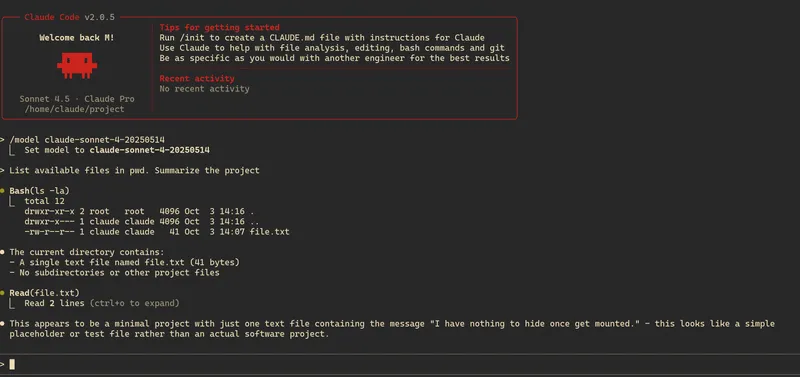
<p><img src="https://matcohle.me/_astro/claude-mounted.DaZnlldv_Z83Efu.webp" alt="Mounted and properly isolated. Ignore the model switch, API was temporarily not working" /></p>
<p>:::details
Going full circle: users, groups and volume mounting</p>
<p>At first, running <code>podman run -v &lt;host/path/to/file&gt;:&lt;container/path/to/workdir/file&gt;</code> worked just fine. The problems started once I created dedicated user.</p>
<p><code>podman exec -it &lt;container-id&gt; bash</code>-ing into the running container revealed the file permissions are misconfigured:</p>
<pre><code class="language-bash">claude@88f672d518e7:~/project$ ls -alh
total 16K
drwxr-xr-x 2 root   root   4.0K Oct  3 13:58 .
drwxr-x--- 1 claude claude 4.0K Oct  3 13:58 ..
-rw-r--r-- 1 root   root   4.8K Oct  3 13:52 file.txt
</code></pre>
<p>At first, I thought the problem needs to be solved <code>podman run -v</code> so tried all the combinations <a href="https://docs.podman.io/en/latest/markdown/podman-run.1.html#volume-v-source-volume-host-dir-container-dir-options">described in the documentation</a>. Having no success and a couple of back-and-forths with an LLM finally led me to <a href="https://docs.podman.io/en/latest/markdown/podman-run.1.html#userns-mode">discovering --userns </a>.</p>
<p>Since we want write access from both host and container, <code>UIDs</code> need to be mapped properly.
:::</p>
<p>The whole effort was severely hampered by something I discovered at the end. While I was playing with various options, writes from container to host were working mostly fine. But once I edited on the host, the mounted file started to behave like two separate files—the host and container each having their own version.</p>
<p>:::details
Looking at <code>inode</code> helped to pin point the root cause</p>
<pre><code class="language-bash"># so far so good
claude@7b0919ebf1df:~/project$ ls -i file.txt
55849983 file.txt
[host]$ ls -i file.md
55849983 file.md

# writing from container via echo, still good
claude@7b0919ebf1df:~/project$ echo test &gt;&gt; file.txt
claude@7b0919ebf1df:~/project$ ls -i file.txt
55849983 file.txt
[host]$ ls -i file.md
55849983 file.md

# writing from container via echo, still good
[host]$ echo test-again &gt;&gt; file.md
[host]$ ls -i file.md
55849983 file.md
[host]$ tail -n2 file.md
test
test-again
claude@7b0919ebf1df:~/project$ tail -n2 file.txt
test
test-again
claude@7b0919ebf1df:~/project$ ls -i file.txt
55849983 file.txt

# writing from host using Neovim, inode has changed
[host]$ ls -i file.md
55861844 file.md
[host]$ tail -n3 file.md
test
test-again
written in Neovim
claude@7b0919ebf1df:~/project$ tail -n3 file.txt

test
test-again

</code></pre>
<p>:::</p>
<p>The problem was Neovim’s default behavior writing to backup file and overwriting the original file on save. I ended up <a href="https://unix.stackexchange.com/questions/36467/why-does-inode-value-change-when-we-edit-in-vi-editor">turning this feature off</a> as my flow heavily utilizes single file mounts. This is likely only an issue when you mount a specific file—directory mounts should work fine.</p>
<h2>The Last Few Miles</h2>
<p>As I’ve been playing with the new flow, it has quickly become clear that going over OAuth
authorization on each <code>podman run</code> becomes boring very quickly.</p>
<p>Since I was running the agent locally before, I knew it is able to somehow cache the credentials and the caching is likely broken due to container isolation.</p>
<p>Reading through <code>claude --help</code>, I’ve noticed <code>claude setup-token</code> and my eyes lit as I was expecting finally easy exercise. After several iterations trying to pass the token to the container, ensuring it is part of the environment, the agent still refused to use it and asked for authorization. Only after reading <a href="https://www.reddit.com/r/ClaudeAI/comments/1mideyc/comment/nd3b0hv/">this recent discussion</a>, I concluded it is a dead end for now.</p>
<p>Since CLI storing their configuration in <code>$HOME</code> has become the industry standard, I played around locally and quickly discovered <code>~/.claude/.credentials.json</code> together with <code>.claude.json</code>. Going through its content I also discovered its a cache of historical conversations stored per project[^3].</p>
<p>[^3]: Check for yourself with <code>jq .projects[].history ~/.claude.json</code></p>
<p>After my initial plan to cherry-pick only the needed bits, I settled with more general flow—run the agent once in an isolation, authorize via browser and let it bootstrap its files. Then <code>COPY</code> them to Docker image during the build. ~Since the token seems to be valid for a year, even the hassle of doing this regularly does not seem to be an issue~
Tokens are valid for six hours by default, requiring regular container rebuilds. <a href="https://github.com/mathewcohle/coding-agents-for-the-paranoid/blob/master/setup.sh">A helper script is available</a>, with workflow improvements in development.</p>
<p>So we need to build the original simplified image, authorize via browser and copy the files from the container locally to later pass them to the final image:</p>
<pre><code class="language-bash">podman build -t claude-code-credentials -f Dockerfile.credentials  .
podman run -it --rm claude-code-credentials

# extract the credentials
podman cp &lt;container-id&gt;:/root/.claude.json ./credentials/.claude.json
podman cp &lt;container-id&gt;:/root/.claude/ ./credentials/.claude

# and build the final image
podman build -t claude-code .

</code></pre>
<p>:::details
Final touches to Dockerfile</p>
<pre><code class="language-dockerfile">
FROM ubuntu:24.04

RUN apt update &amp;&amp; apt install -y nodejs npm
RUN npm install -g @anthropic-ai/claude-code
# Setup proper user
RUN groupadd -f -g 1234 claude &amp;&amp; \
    useradd -u 1234 -g 1234 -ms /bin/bash claude

# Provide OAuth credentials
COPY credentials/ /home/claude/
# Required for credentials to be uptaken
RUN chown -R claude:claude /home/claude/
WORKDIR /home/claude/project
USER claude
# Run claude as the default command
ENTRYPOINT ["claude"]
</code></pre>
<p>:::</p>
<p>Voilà!</p>
<figure>


  <figcaption>Looks almost trivial...</figcaption>
</figure>
<h2>Finally Having Some Fun</h2>
<p>You might be wondering why I’m so stubborn to mount just single file. My flow interacting with LLMs has been so far tediously copy pasting either code snippets or <a href="/writing-with-llms">partial writings</a> between the editor and the browser. With the setup above, I might finally level up my game.</p>
<p>I’ve been using <a href="https://obsidian.md/">Obsidian</a> as my daily driver for personal notes. The implementation simplicity using markdown files made it possible to synchronize across multiple devices quite easily[^4]. And as the files are stored locally, writing feels snappy and there are no outages[^5].</p>
<p>[^4]: Using <a href="https://syncthing.net">syncthing</a></p>
<p>[^5]: Even though I’m fan of <a href="https://notion.so">Notion</a> in collaboration setup, you inevitably need to trust the company behind it with your data to enjoy its benefits. So <a href="https://www.schneier.com/blog/archives/2025/06/what-llms-know-about-their-users.html">for obvious reasons</a>, I usually end up avoiding sharing the data whenever the operational costs are manageable.</p>
<p>Recently, <a href="/revisiting-shell">I’ve started to have fun with <code>nushell</code></a> and come up with this helper that lets me quickly open any note from my vault:</p>
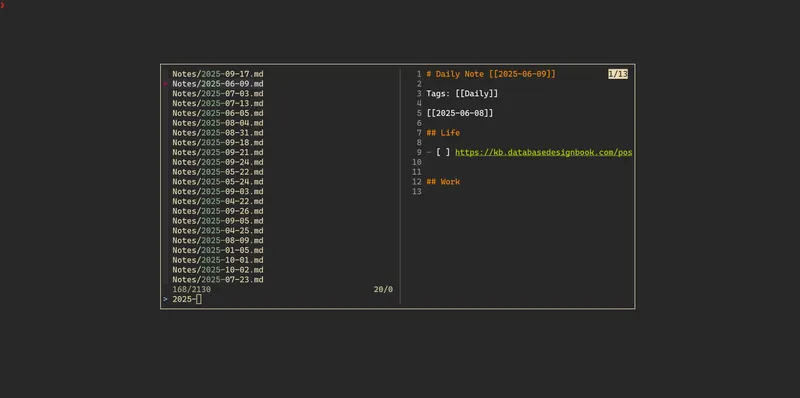
<p><img src="https://matcohle.me/_astro/sucker-for-fuzzy.CmsBDhR9_17oy7f.webp" alt="I'm sucker for fuzzy find" /></p>
<p>Modifying the snippet slightly gives us a powerful way to selectively feed context to the agent—ensuring only whitelisted files are exposed. The <code>--multi</code> flag even allows selecting multiple files or directories at once.</p>
<p>:::details
Easy peasy—just swap Neovim for Claude</p>
<pre><code class="language-nushell">
let coding_agent_bind = {
    name: claude-code
    modifier: &lt;modifier&gt;
    keycode: &lt;keycode&gt;,
    mode: [vi_normal, vi_insert]
    event: [
      {
        send: executehostcommand
        cmd: '
          let result = fd --type file --type directory --hidden |
               sk --tmux=center,60% --multi --preview "bat --style=numbers --color=always {}" -p "Select LLM scope: ";

          let mount_points = $result | split row "\n" | each { |item|
              let base = (echo $item | path basename);
              $"-v ./($item):/home/claude/project/($base)"
            } | str join " ";

          let command = $"^podman run -it --rm --userns=keep-id:uid=1234,gid=1234 ($mount_points) claude-code"
          commandline edit -r $"($command) ";
          commandline set-cursor --end;
        '
      }
    ]
}
</code></pre>
<p>:::</p>
<figure>


  <figcaption>Thought Claude might be more into this!</figcaption>
</figure>
<hr />
<p>That was quite the adventure! I definitely overestimated how fast this would go. But hey, at least the end result delivered. Now I’m curious to see how well this actually works in practice.</p>
]]></content>
        <published>2025-10-03T00:00:00.000Z</published>
    </entry>
    <entry>
        <title type="html"><![CDATA[What Is Async Anyway]]></title>
        <id>https://matcohle.me/what-is-async-anyway</id>
        <link href="https://matcohle.me/what-is-async-anyway"/>
        <updated>2025-10-02T00:00:00.000Z</updated>
        <content type="html"><![CDATA[<p>While going through my article backlog, <a href="https://github.com/AndreLouisCaron/a-tale-of-event-loops">A tale of event loops</a> dragged me once again into the world of asynchronous programming.</p>
<p>There are already many great resources explaining asynchronous programming out there. <a href="https://www.youtube.com/watch?v=Xbl7XjFYsN4">Lukasz Langa’s wonderful video series</a> covers both the basics and internals of the implementation in Python. Complement it with <a href="https://trio.readthedocs.io/en/stable/tutorial.html">Trio tutorial</a> and you are practically ready to go. Afterwards, you might enjoy <a href="https://journal.stuffwithstuff.com/2015/02/01/what-color-is-your-function/">the coloring parable</a> to come full circle <a href="https://lucumr.pocoo.org/2024/11/18/threads-beat-async-await/">and declare threads to be superior</a>.</p>
<p>My goal is to gradually build a simplified mental model to make asynchronous thinking more intuitive. I hope it helps you develop an even firmer grasp of the concept you are already familiar with. Although the examples are in Python, some of these ideas should carry over to other contexts.</p>
<hr />
<h2>Necessary Building Block</h2>
<p>The essential piece for asynchronicity in the programming is the ability to suspend and resume the code execution. In Python world, meet <a href="https://peps.python.org/pep-0492/#new-coroutine-declaration-syntax">coroutines</a>:</p>
<pre><code class="language-python">async def coro(name):
    print(f"Hi, {name}, from coroutine!")

</code></pre>
<p>Being familiar with <a href="https://docs.python.org/3/library/asyncio.html">asyncio</a>, you might be tempted to bring <a href="https://docs.python.org/3/library/asyncio-eventloop.html#asyncio.loop.run_until_complete">run_until_complete</a> in to execute. But given the simplicity of our <code>coro</code>, the following is more than enough to give us the same result:</p>
<pre><code class="language-python">def run(coro):
    try:
        # here we resume coroutine to be executed
        return coro.send(None)
    except StopIteration as e:
        return e.value

# note that the coroutine is created suspended
c = coro("you")
run(c)

</code></pre>
<p>How come that we can run asynchronous function without the event loop? Is event loop doing more than just calling <code>.send</code> on coroutine?[^1]</p>
<p>[^1]: There’s a lot we’ll deliberately omit for the sake of exposition. <a href="https://mleue.com/posts/yield-to-async-await/#yield-from">And this post</a> already offers an exceptional, in-depth explanation of the more complex reality</p>
<p>Take a look at slightly more involved asynchronous addition:</p>
<pre><code class="language-python">async def add(numbers):
    async def _dissolve(number):
        return [1 for _ in range(number)]

    async def _cardinality(elements):
        return len(elements)

    count = 0

    for n in numbers:
        dissolved = await _dissolve(n)
        count += await _cardinality(dissolved)

    print(f"Sum of {numbers} is {count}")
</code></pre>
<p>Will this work with <code>run</code> as defined above? Or do we need to already invoke the loop? Why? What if we rewrite the loop part like this:</p>
<pre><code class="language-python">for n in numbers:
        dissolved = run(_dissolve(n))
        count += run(_cardinality(dissolved))
</code></pre>
<p>Is the code more familiar with <code>await</code> gone? The above snippet is essentially inlining the syntax sugar. We are able to run the computation declared with <code>async def</code>, yet we are completely ignoring <code>asyncio</code> or anything vaguely related to it. We are basically writing <em>good ol’ fashioned</em> synchronous code in just very convoluted way. Ouch.</p>
<p>To observe consecutive resumptions, we need to bring <code>yield</code> into play:</p>
<pre><code class="language-python">from types import coroutine


@coroutine
def really_just_coro():
    yield 1
    yield 1
    return 2
</code></pre>
<p>Luckily, it behaves similar to the coroutines defined using <code>async def</code>:</p>
<pre><code class="language-python">c = really_just_coro()
r1 = run(c)
r2 = run(c)
r3 = run(c)

assert r1 + r2 == r3
</code></pre>
<p>However, our naive <code>run</code> implementation quickly reaches its limits, since fully exhausting the coroutine requires manually invoking it multiple times.</p>
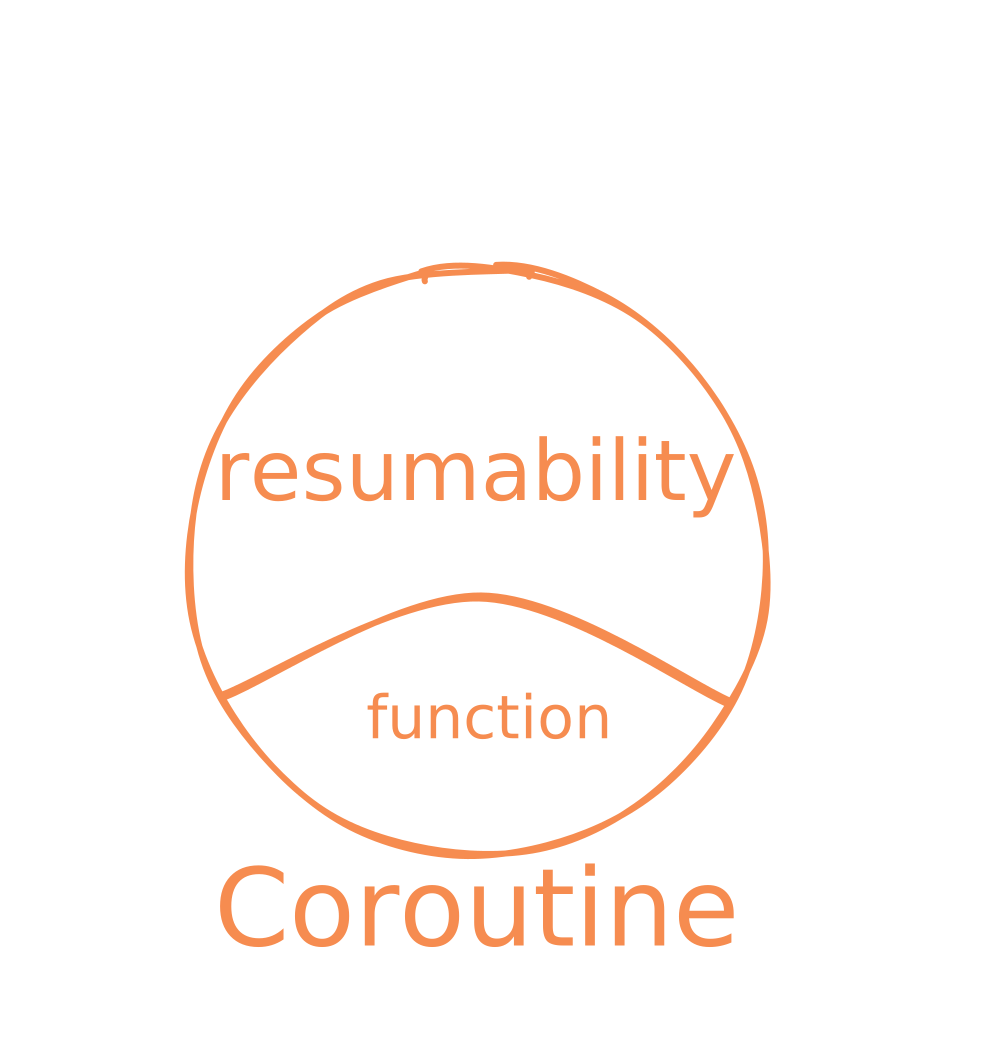
<p>While the coroutines are necessary building block, they do not give us any asynchronicity out of the box.</p>

<p><img src="https://matcohle.me/_astro/mm-coroutine.bnpUS1Jr_29doai.svg" alt="Coroutine in a nutshell" /></p>
<h2>All You Need Is Runtime</h2>
<p>Assuming you’ve already wrapped your head around the asynchronous paradigm, there’s a good chance someone’s asked you to roll your own naive event loop. If not, let’s fix that now—building one from scratch is a great way to understand the internals.</p>
<p>Our goal is to implement a function:</p>
<pre><code class="language-python">def loop_run_until_complete(coro):
    ???
</code></pre>
<p>which takes coroutine and run it until its completion. To test that implementation is working, we will use this program:</p>
<pre><code class="language-python">async def coro():
    await spawn(say("Hi"))
    await spawn(say("you"))
    print("!")


async def say(word):
    print(word)


@coroutine
def spawn(coro):
    yield coro
</code></pre>
<p>Once it is running, we should get:</p>
<pre><code>❯ python loop_run_until_complete.py
Hi
you
!
</code></pre>
<p>Unless you’re reading this on your phone, stop right now and just try to write it down. Set a timer for 5 minutes, then give it your all to implement <code>loop_run_until_complete</code>.</p>
<p>If you get stuck, try these prompts:</p>
<ul>
<li>original <code>run</code> method is not sufficient to inline <code>await spawn(say("hi")</code> as <code>spawn</code> return value is new <code>say</code> coroutine. Thus we need something to <code>.send</code> on newly spawned coroutines too</li>
<li>until now our coroutines were returning value only when exhausted (i.e. <code>StopIteration</code> raised). <code>spawn</code> is different as it can return multiple values before its done</li>
<li>think in terms of two distinct APIs. One between you, the developer, and <code>loop_run_until_complete</code> and second between <code>loop_run_until_complete</code> and the coroutines</li>
</ul>
<hr />
<p>Let’s take a look at working example:</p>
<pre><code class="language-python">def loop_run_until_complete(coro):
    coros = [coro]
    while coros:
        queue, coros = coros, []
        for c in queue:
            try:
                # advance the coro by one step
                d = c.send(None)
            except StopIteration:
                # coro is exhausted, nothing more to do with `c`
                pass
            else:
                # schedule child first for the next loop round
                # as such implementation gives us a warm but
                # false feeling of determinism
                if iscoroutine(d):
                    coros.append(d)
                # as c.send did not raised StopIteration,
                # current task is not exhausted and
                # has to be rescheduled
                coros.append(c)
</code></pre>
<p>Not counting comments, it’s only 12 lines of code—yet there’s a ton to unpack.</p>
<p>One issue you might have encountered is consistently getting this output:</p>
<pre><code>❯ python loop_run_until_complete.py
Hi
!
you
</code></pre>
<p>Our toy implementation doesn’t yet support anything that can shuffle the execution order of coroutines. Such mess will come only once we introduce a mechanism, like <code>sleep</code>, with ability to reorder coroutines in the queue. Then you’ll see that expecting a predictable output when using <code>spawn</code> is, to put it mildly, a bit hopeful.</p>
<p>Another takeway is that <code>yield</code> is the only place when coroutine gives up control and let the loop to decide what happens next. That’s where the coroutine cooperation happens. <code>await</code> statements themselves does not interact with the loop. Consider following example:</p>
<pre><code class="language-python">async def coro():
    await spawn(say("you"))
    await say("Hi")
    await say("!")
</code></pre>
<p>You might try shuffling the lines in <code>loop_run_until_complete</code> up and down, but you won’t be able to squeeze anything between the <code>Hi</code> and <code>!</code> prints—they’re just good ol’ synchronous code running back-to-back.</p>
<p>In our current implementation, reading <code>async def</code> full of <code>await</code> is actually the same as going over plain sequential synchronous code. Unfortunately, we will later see that validity of such assumptions depends on the runtime we use.</p>
<p>The tricky part of async is keeping track of what’s happening at any given moment, and it only gets tougher when every <code>await</code> becomes a potential <a href="#managing-the-forking-points">forking point</a>.</p>
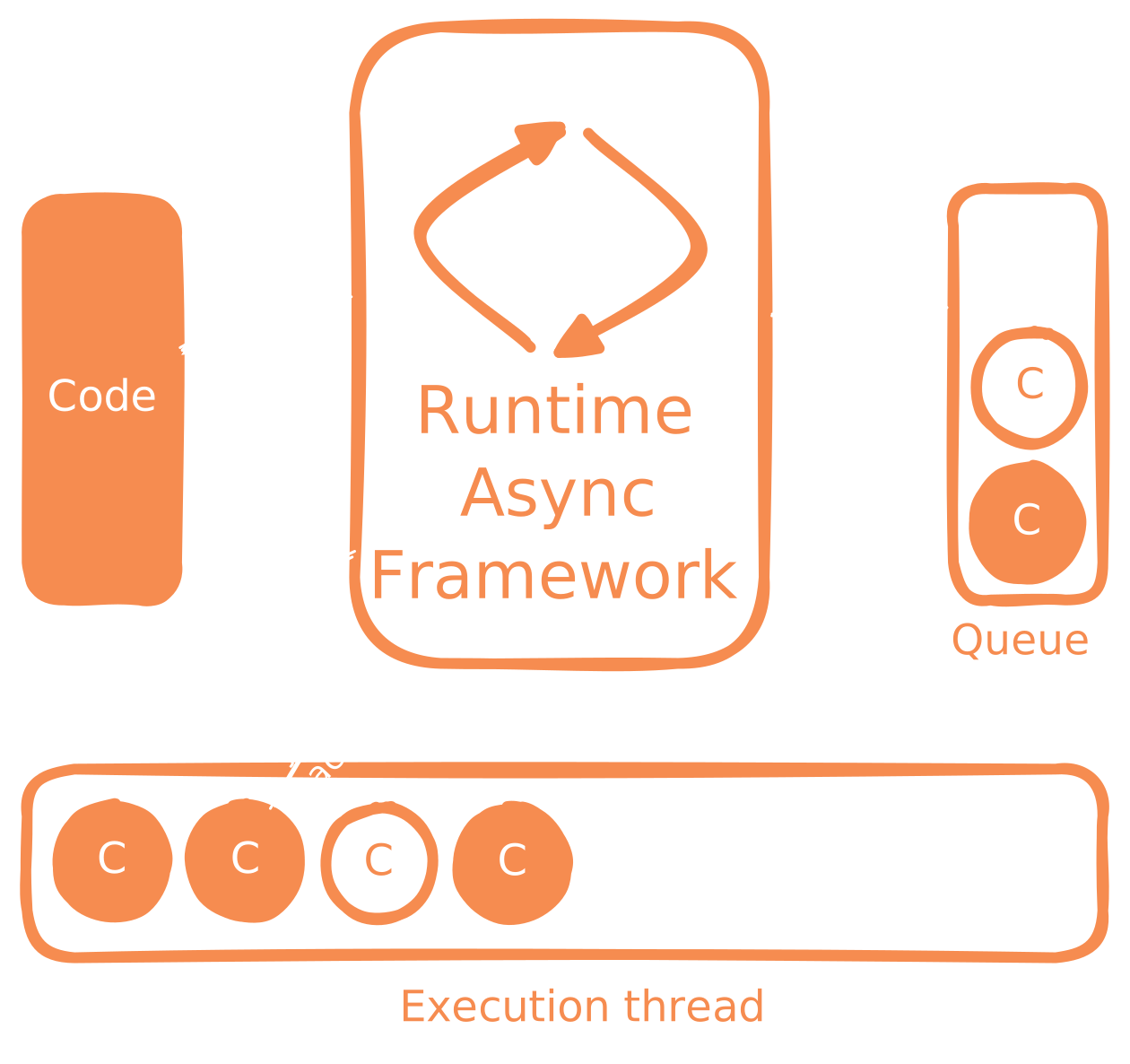
<p>Lastly, the point you’ve probably already guessed: there’s no real asynchronicity without the runtime framework like <code>loop_run_until_complete</code> driving it. You need both cooperative coroutines and the runtime to orchestrate them.</p>
<p>Language designers can make our life easier with features like <code>async/await</code> but it’s the runtime—and the yield-based machinery—that actually delivers the async magic. And it’s the runtime designers who decide which APIs we, the developers, get to use.</p>
<p>Next we extend our runtime API with <code>sleep</code> feature to illustrate the source of non-determinism in async code.</p>

<p><img src="https://matcohle.me/_astro/mm-framework.D3rf5rdf_AjJHG.svg" alt="Async runtime in a nutshell" /></p>
<h2>Sleep</h2>
<p>As before, give it a shot and implement it on your own. Being in charge of our runtime design, we can decide how <code>sleep</code> is implemented internally. The goal is to expose <code>async def sleep</code> which behaves like the standard <code>time.sleep</code> but while coroutine is sleeping, pending coroutines in the queue can continue spinning.</p>
<p>Test your implementation against following code:</p>
<pre><code class="language-python">async def coro():
    # note the order in which the prints are declared
    await spawn(say_after("you", 2))
    await spawn(say_after("!", 3))
    await spawn(say_after("Hi", 1))


async def say_after(word, seconds):
    await sleep(seconds)
    print(word)
</code></pre>
<p>again expecting:</p>
<pre><code>❯ python loop_with_sleep.py
Hi
you
!
</code></pre>
<hr />
<p>:::details
Sadly, even a naive implementation gets already fairly involved</p>
<pre><code class="language-python">from types import coroutine
import time


def loop_run_until_complete(coro):
    coros = [coro]
    # bench for coros waiting for their time to run
    waiting = []
    # yes, you are right - CPU can be unnecessary spinning
    # if there are `waiting` coros but none of them ready
    # try to implement more eco friendly version as an exercise
    while coros or waiting:
        queue, coros = coros, []
        ready, waiting = _get_ready_coros(waiting, time.time())
        # prepend or append, just an implementation detail
        # and not proper coordination mechanism
        # it's best to consider coroutines to be
        # independent of each other
        queue = ready + queue
        for c in queue:
            try:
                d = c.send(None)
            except StopIteration:
                pass
            else:
                # runtime internal API is extended
                # we now support multitude of "yield commands",
                # each with their own payload
                match d:
                    case None:
                        coros.append(c)
                    case ("spawn", child_coro):
                        coros.append(child_coro)
                        coros.append(c)
                    case ("sleep", seconds):
                        scheduled_time = time.time() + seconds
                        waiting.append((c, scheduled_time))


def _get_ready_coros(waiting, now):
    # a way how to figure which waiting coro are ready
    ready, still_waiting = [], []
    for coro, scheduled_time in waiting:
        # this tells the story why `await sleep(seconds)`
        # does not give you any guarantee of coroutine
        # being executed exactly in `seconds`
        if scheduled_time &lt; now:
            ready.append(coro)
        else:
            still_waiting.append((coro, scheduled_time))

    return ready, still_waiting


@coroutine
def spawn(coro):
    yield ("spawn", coro)


@coroutine
def sleep(seconds):
    yield ("sleep", seconds)

</code></pre>
<p>:::</p>
<ul>
<li>the runtime internal API with <code>yield</code> coroutines is extended. Coroutines now yields structured objects communicating to the runtime what should happen at the point of cooperation</li>
<li>the cooperating coroutines must be compatible with the runtime API. The previous <code>spawn</code> version would not work with the current implementation [^2]</li>
<li><code>sleep</code> rips apart our previous ability to read and predict the order of <code>spawn</code> coroutine execution. The link between the order code is declared and the order it actually runs is gone</li>
</ul>
<p>[^2]: That’s why <a href="https://docs.python.org/3/library/asyncio-task.html#asyncio.sleep">different</a> runtimes require <a href="https://trio.readthedocs.io/en/stable/reference-core.html#trio.sleep">specialized</a> tools to implement the same concept</p>
<p>The last point is best understood with following snippet:</p>
<pre><code class="language-python">async def coro():
    await spawn(ping_db())
    await spawn(ping_url())


async def ping_db():
    await sleep(db_sleep_duration)
    print("DB pinged")


async def ping_url():
    await sleep(url_ping_duration)
    print("URL pinged")
</code></pre>
<p>The actual execution order hinges entirely on <code>db_ping_duration</code> and <code>url_ping_duration</code>. So? Without peeking at how coroutines scheduled with <code>spawn</code> are implemented, there is suddenly no way to predict what will happen at runtime. They become independent execution units.</p>
<p>See if you can predict what this snippet will print:</p>
<pre><code class="language-python">async def coro():
    await ping_db()
    await ping_url()
</code></pre>
<p>Hopefully the hammering of the same point paid off—no matter the values of <code>db_ping_duration</code> and <code>url_ping_duration</code>, <code>ping_db</code> always runs first. That’s because, from our runtime’s perspective, there is just single <code>coro</code> coroutine as there is no <code>spawn</code> call. Real asynchronicity only shows up once you schedule multiple coroutines and let the runtime interleave them.</p>
<p>Which finally brings us to the real culprit behind async pain—what scheduling API is exposed by the runtime.</p>

<p><img src="https://matcohle.me/_astro/mm-api.GJ-26UHX_VjwrK.svg" alt="The runtime API surface can be quite rich" /></p>
<h2>Managing The Forking Points</h2>
<p>While the runtime we’ve built so far has its limitations[^3], it nicely reveals the potential hazards of the design. When you look closer at <code>spawn</code> implementation, it becomes clear that every call to it is effectively modifying a global variable <code>queue</code>. So the runtime state can be modified from anywhere in the code. Let me assume I don’t have to sell you on why this might cause troubles.</p>
<p>[^3]: You may have noticed that we are not able to retrieve return value from <code>spawn</code> coroutines</p>
<p>Thus every <code>await</code> potentially represent a fork in the execution tree as <code>spawn</code> might be called internally. Up until that call, you can usually read the code as a straightforward, sequential flow. After it, though, you have no idea what’s in the <code>queue</code> or how many coroutines are running.</p>
<p>Don’t get me wrong, we obviously need a way how to run multiple coroutines at once, or else the whole <a href="#all-you-need-is-runtime">async premise goes out of the window</a>. But with global access, it’s all on the developer to not mess up and keep the app well-structured.</p>
<p>Consider following program:</p>
<pre><code class="language-python">async def main():
    t1 = asyncio.create_task(fetch_and_store())
    # inform the server we are alive
    t2 = asyncio.create_task(ping_pong_client())

    # manage the running tasks
    await t1
    await t2


async def fetch_and_store():
    while True:
      data = await read_data()
      t = asyncio.create_task(store_data(data))
      # what to do with `t`?
</code></pre>
<p>Common answers are:</p>
<ul>
<li><code>await t</code></li>
<li>do not handle <code>t</code> at all</li>
</ul>
<p>Which one do you prefer? Can you think about what might be the problem?</p>
<p>First, few assumptions about its intent. Presumably, the <code>read_data</code> function’s job is to fetch incoming data—say, from an HTTP request or a WebSocket—and then persist it, perhaps into a database. And since we’re using async here, we are likely trying to squeeze out every drop of throughput.</p>
<p>When we <code>await t</code>, we are essentially giving up on the concurrency benefits. As examples in previous sections showed us, call to <code>create_task</code> is useless and the implementation is basically the same as:</p>
<pre><code class="language-python">async def fetch_and_store():
    while True:
      data = await read_data()
      await store_data(data)
</code></pre>
<p>Calling <code>store_data</code> is simply blocking and <code>fetch_and_store</code> is executed sequentially.</p>
<p>Well, surely you are now convinced that we just should not handle <code>t</code>. By calling <code>create_task</code>, we are appending new coroutines for the runtime to execute, the call itself is non-blocking so we can right away call <code>read_data</code> again. The execution scales.</p>
<p>Can you think of what can go wrong?</p>
<hr />
<p>Arguably, the second approach is worse than the first one. In the first case, the program is at least doing what we would expect, even though it might be slow. There is so much which can go wrong in second version. Let’s go over some of the failure modes one by one. Guess the runtime output before executing the code.</p>
<p><em>Losing data and not knowing about it is easy</em></p>
<pre><code class="language-python">async def main():
    t = asyncio.create_task(store_data())
    await t


async def store_data():
    async def read_data():
        return 1

    while True:
       data = await read_data()
       asyncio.create_task(buggy_store(data))
       await asyncio.sleep(1)


async def buggy_store(data):
    raise ValueError("There is something wrong with me")
</code></pre>
<p>The program will just keep running without saving any data. If you’re lucky enough to have error-log monitoring, you’ll get an alert. If not, you’ll blissfully cruise along until that mysterious “missing client data on production” bug lands in your inbox.</p>
<p><em>Or even easier way to loose the data</em></p>
<pre><code class="language-python">async def main():
    t = asyncio.create_task(store_data())
    await t
    print("Successfully finished! :crossed-fingers:")
    print(f"Psst: {asyncio.all_tasks()}")


async def store_data():
    async def read_data(count):
      return count + 1

    for count in range(5):
      data = await read_data(count)
      asyncio.create_task(store(data))


async def store(data):
    await asyncio.sleep(1)
</code></pre>
<p>Because <code>store</code> calls run independently of <code>main</code>, the <code>await t</code> hits immediately. With nothing else holding the entry point open, the interpreter just shuts down. It doesn’t even know about those scheduled coroutines—they’re just memory chunks to it.</p>
<p>Only the runtime framework tracks them, and we never told it to manage them. It’d be great if we could surface every spawned coroutine up the stack so they can be dealt with in one place.</p>
<p>Also it’s a good example how the responsibilities are split between the developer, the runtime framework, and the language.</p>
<p><em>Or chasing the mysterious production bugs</em></p>
<p>Coming back to the original snippet–imagine traffic spike so that new <code>store_data</code> coroutines are created non-stop.</p>
<p>Suddenly your database connection pool maxes out and writes start failing. Or there is a sudden spike in storage duration even though the database looks healthy because the coroutines are waiting for the execution in ever growing loop as the runtime overhead balloons.</p>
<p>Such bugs are a nightmare to debug. To reproduce them, you’d have to both mimic production traffic patterns and watch the queue size at the same time. And they’re really hard to spot as you have to follow every <code>await</code> all the way through.</p>
<hr />
<p>I’m actually not trying to slam <code>asyncio</code> itself. These issues can be usually fixed by adding communication primitives like <a href="https://docs.python.org/3/library/asyncio-queue.html#asyncio.Queue">queues</a> or by ditching global spawning in favor of <a href="https://docs.python.org/3/library/asyncio-task.html#asyncio.TaskGroup">TaskGroup</a>.</p>
<p>Using TaskGroup, originally introduced as <a href="https://trio.readthedocs.io/en/stable/reference-core.html#nurseries-and-spawning">Trio nursery</a>, gives you one more huge benefit:</p>
<pre><code class="language-python">async def main():
    async with asyncio.TaskGroup() as tg:
        task1 = tg.create_task(tricky_coro(tg, ...))
        task2 = tg.create_task(plain_coro(...))

</code></pre>
<p>By explicitly passing <code>tg</code> factory to the coroutine, we can easily separate the shady ones spawning new coroutines on fly from the boring rest that execute sequentially internally. <code>trio</code> just goes a step further by deliberately offering a more constrained API compared to <code>asyncio</code>.</p>
<p>Lastly, keep in mind this isn’t an <code>async</code>/<code>await</code>–only problem. You’ll inevitably encounter the same pitfalls in implementation using <a href="https://zio.dev/reference/fiber/#global-lifetime">effect systems that let you tweak global state</a>.</p>
<p><img src="https://matcohle.me/_astro/mm-taskgroup.B9cksT_P_19YVzj.svg" alt="Pretend it is almost comprehensible" /></p>
<h2>Wrapping Up</h2>
<p>Coroutines give us cooperative multitasking by letting us pause and resume execution at will. Features like <code>async</code> and <code>await</code> make writing and reading asynchronous code a lot smoother, but they don’t actually <em>do</em> the concurrency themselves—that’s the job of the runtime.</p>
<p>In other words, the runtime’s API defines how concurrency works in your program. And exposing global scheduling controls makes writing and understanding your code much harder.</p>
]]></content>
        <published>2025-10-02T00:00:00.000Z</published>
    </entry>
    <entry>
        <title type="html"><![CDATA[About]]></title>
        <id>https://matcohle.me/about</id>
        <link href="https://matcohle.me/about"/>
        <updated>2025-09-29T00:00:00.000Z</updated>
        <content type="html"><![CDATA[
<div class="about-intro">
<p><img src="https://matcohle.me/_astro/face.CAT2eMoI_Z1XF80O.webp" alt="" /></p>
<div class="about-text">
<p>Hi 👋</p>
<p>I’m Matej but feel free to call me Mathew.</p>
</div>
</div>
<p>After years of thinking about creating a space to share my thoughts, a work break finally gave me the push I needed.</p>
<p>A bit about me: I live in Prague and have been fortunate to explore diverse fields throughout my career, most of which lie at the intersection of mathematics, software engineering, and <a href="https://www.youtube.com/live/EIBqHXKOGVM">decision-making</a>.</p>
<p>Shortly on what you can expect here. The content here is pretty much unconstrained besides the following two rules: explore whatever captures my interest and make it easy for you, the reader, to digest. Some time ago I’ve got convinced that <a href="https://fs.blog/how-to-think/">writing is immensely useful skill</a>. And since the only way how to acquire the skill is to practice it, having a blog was inevitable.</p>
<div class="about-m">
<div class="about-text">
<p>Would like to get in touch?</p>
</div>
<p><img src="https://matcohle.me/_astro/m.DYp3RZz3_Z4zRV.svg" alt="" /></p>
</div>]]></content>
        <published>2025-09-29T00:00:00.000Z</published>
    </entry>
</feed>